Grid Planning Software: Tools, Comparisons and How to Choose
Grid planning software helps utilities, system operators, developers and consultants answer a difficult question: how should the electricity network evolve so that it remains affordable, reliable and technically secure?
The answer cannot come from one calculation. A credible plan must connect long-term investment choices with hourly operation, reliability under uncertainty and the electrical behaviour of the network. This is why the software landscape contains several tool families, each designed for a different layer of the problem.
What grid planning software does
Grid planning turns forecasts and policy objectives into infrastructure decisions. Depending on the study, software may be used to:
- forecast how demand, generation and storage may change;
- select generation, transmission or storage investments across several years;
- simulate dispatch, congestion, prices, losses and renewable curtailment;
- measure resource adequacy under outages, weather variability and uncertain demand;
- validate power flows, voltages, fault levels and contingencies;
- check small-signal, RMS and EMT dynamic performance.
The best tool is therefore not simply the one with the longest feature list. It is the one that represents the decisions, time horizon, uncertainty and electrical detail required by the study.
Grid planning software versus grid simulation software
The terms are often used as if they were interchangeable. They overlap, but their main purposes differ.
| Planning versus simulation | ||
|---|---|---|
| Question | Grid planning software | Grid simulation software |
| Primary purpose | Compare future decisions and investments | Calculate the behaviour of a defined network |
| Typical horizon | Hours to several decades | Microseconds to hours, plus time-series studies |
| Typical outputs | Build plans, costs, adequacy, dispatch and risk | Flows, voltages, fault currents and dynamic response |
| Typical methods | Scenario analysis, optimisation and probabilistic modelling | Steady-state, RMS and EMT numerical simulation |
| Core decision | What should change, where and when? | Will this defined system operate securely? |
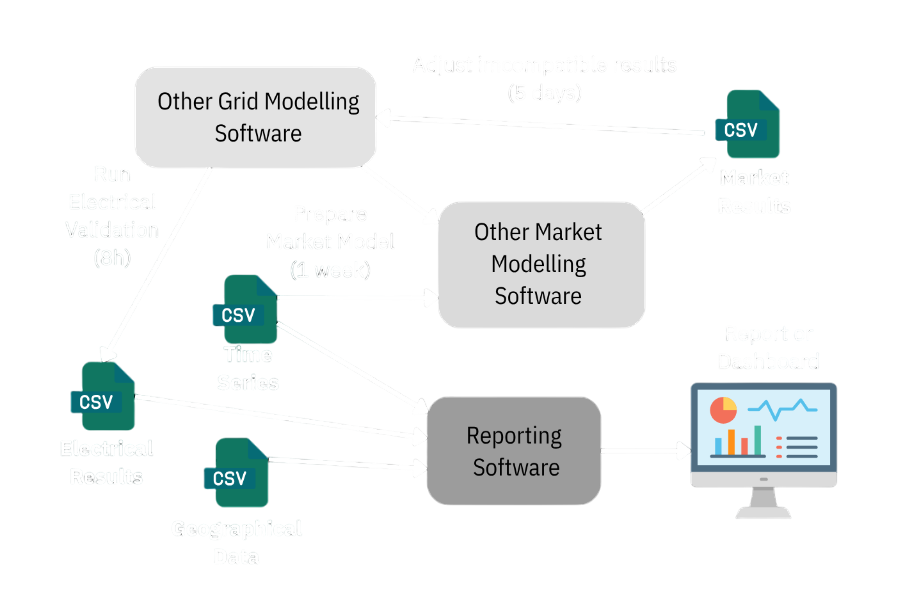
A capacity-expansion model can identify an attractive portfolio but simplify the grid too much to prove electrical feasibility. A detailed simulator can validate a candidate project but may not determine the best investment pathway. Planning teams often connect both tool types through exports, conversion scripts and repeated manual iterations.
The four layers of modern grid planning
1. Capacity and investment expansion
Capacity-expansion tools choose what generation, storage, transmission or conversion assets should be built and when. They often optimise net present cost over a horizon of 10 to 30 years while representing policy, emissions, fuel and technology constraints.
2. Production cost and market simulation
Production-cost models simulate unit commitment and dispatch for a fixed portfolio, usually at hourly or sub-hourly resolution. They reveal operating cost, congestion, prices, emissions and curtailment.
3. Resource adequacy
Adequacy models ask whether enough dependable capacity is available when demand is high or resources fail. Common outputs include LOLE, LOLP and expected unserved energy.
4. Detailed network and stability analysis
Electrical studies determine whether the plan respects thermal, voltage, fault-level and stability limits. They include nonlinear AC power flow, short circuit, N-1 security, optimal power flow, small-signal stability, RMS and EMT simulation.
Main commercial grid planning tools
PLEXOS and the PSR suite
PLEXOS and PSR products such as OptGen and SDDP are strong choices for long-term expansion, stochastic operation, market simulation and resource planning. Their strength is economic and operational optimisation across long horizons. Detailed fault and dynamic network studies normally require a dedicated electrical model or an additional simulator.
PSS E
Siemens PSS E is widely used for transmission planning and analysis. It provides large-scale power flow, contingency, short-circuit, voltage-stability and RMS dynamic studies, supported by extensive automation and model libraries. Multi-year capacity optimisation is not its primary public positioning, so portfolio decisions are often developed elsewhere and validated in PSS E.
PowerFactory
DIgSILENT PowerFactory combines a broad electrical model with steady-state, RMS, EMT, protection, harmonics and time-series capabilities. Its scenarios, variations and expansion stages support network planning, while economic capacity-expansion optimisation is typically handled through a separate planning process.
Specialist tools
ETAP is frequently used for industrial and distribution design, protection and operational studies. PSCAD specialises in high-detail EMT analysis of controls, power electronics and fast transients. These tools can be essential in a planning programme even when they do not own the complete long-term investment workflow.
Main open-source grid planning and simulation tools
PyPSA
PyPSA is a Python framework for energy-system optimisation, capacity expansion, dispatch and sector coupling. It also provides static power flow, but it is not designed as a full short-circuit and dynamic-stability suite.
pandapower, MATPOWER and OpenDSS
pandapower focuses on automated network analysis and optimisation in Python. MATPOWER is widely used for power flow and OPF research in MATLAB, while OpenDSS specialises in distribution-system and time-series studies. They are valuable simulation foundations, but complete investment-planning workflows generally require additional models and code.
VeraGrid
VeraGrid is an open-source power-system planning and simulation platform designed to keep macro planning and detailed electrical validation in one object-oriented data model. It combines expansion and investment optimisation, market dispatch, resource adequacy, time series, nonlinear AC/DC studies, contingency, short circuit, small-signal stability, RMS and EMT simulation.
Feature and vendor landscape
The table below compares the capabilities that matter when moving from a long-term investment hypothesis to detailed electrical validation. It is not a ranking. “Native” means the capability is delivered inside the named platform or suite. “Integration” means another tool or a substantial custom workflow is normally required.
| Capability | VeraGrid | PLEXOS / PSR | PyPSA | PSS E | PowerFactory |
|---|---|---|---|---|---|
| PLANNING AND INVESTMENT | |||||
| Multi-year capacity and investment optimisation | Native | Native | Native | Not core CEP | Scenario planning |
| Production cost, dispatch and time series | Native | Native | Native | Available | Available |
| Investment Pareto analysis with technical penalties | Native | Different optimisation | Custom workflow | Integration | Integration |
| DETAILED GRID ANALYSIS | |||||
| Nonlinear AC power flow and contingency | Native | Integration | Available / limited security scope | Native | Native |
| Short-circuit analysis | Native | Integration | Not identified | Native | Native |
| Small-signal and RMS dynamic simulation | Native | Integration | Integration | Native | Native |
| EMT simulation | Native | Integration | Integration | Co-simulation | Native |
| WORKFLOW | |||||
| Shared model from investment planning to dynamics | Native | Grid simulator required | Dynamic tool required | CEP tool required | CEP tool required |
| Open-source core | Yes, MPL 2.0 | No | Yes | No | No |
Comparison reviewed against publicly available product information on 28 July 2026. Capabilities may depend on version, licence, modules and custom implementation. Product names and trademarks belong to their respective owners, which do not endorse or sponsor this comparison.
Qualified conclusion: among the platforms compared, VeraGrid is the only one that natively combines multi-year investment optimisation with detailed steady-state and dynamic electrical studies in one open-source data model.
Why VeraGrid connects planning and simulation
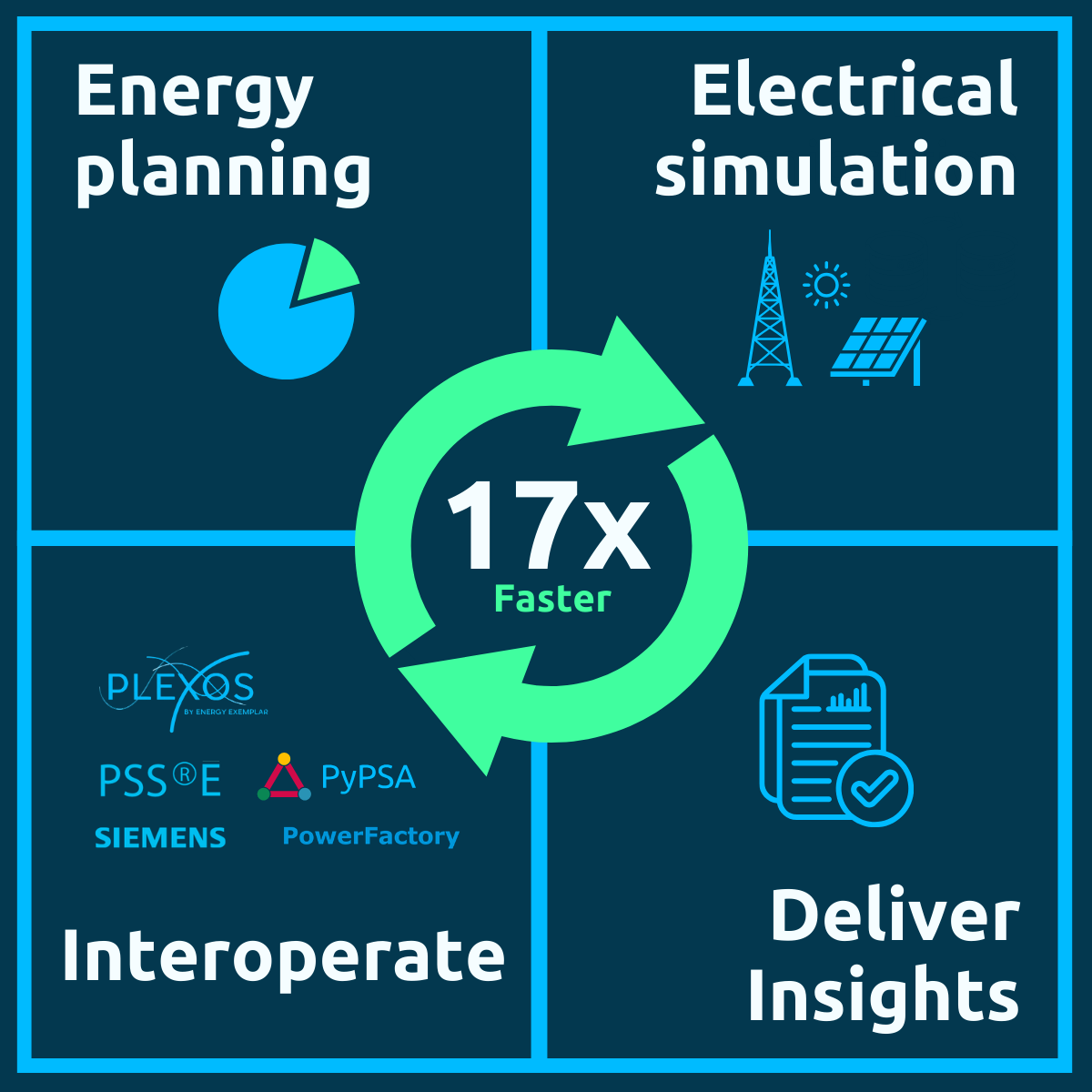
VeraGrid uses the same network objects, time dimension and results architecture across the workflow. A planner can test investments, inspect an optimal Pareto set, and validate selected candidates without rebuilding the grid in a separate simulator.
Investment Pareto optimisation
A single “lowest-cost” answer can hide unacceptable overloads, voltage problems or reliability risk. VeraGrid’s investment framework evaluates economic and technical objectives together. The resulting Pareto front shows the trade-off between capital and operating cost on one side and losses or technical penalties on the other.
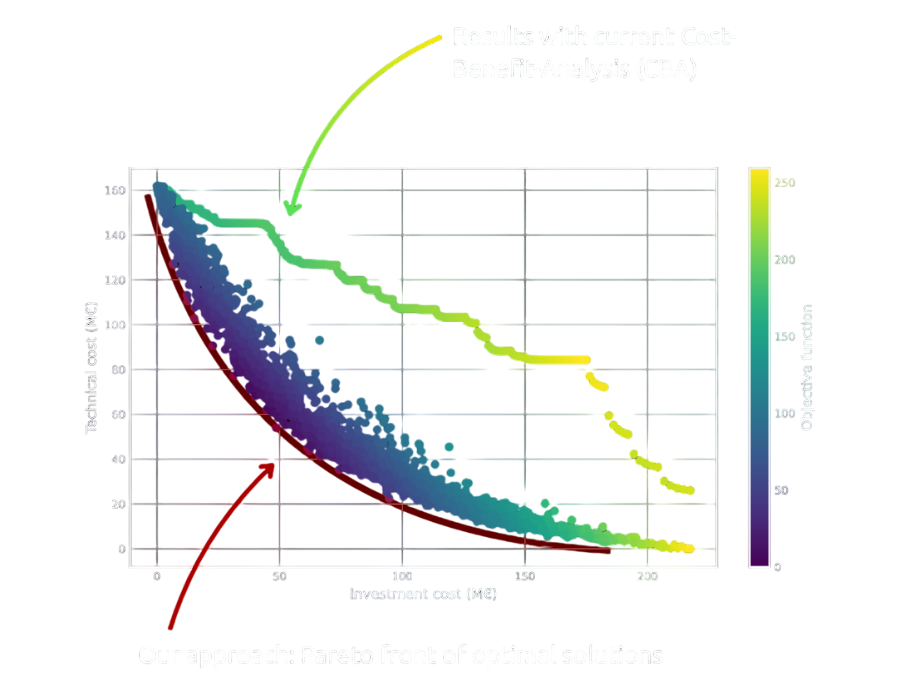
This does not remove engineering judgement. It gives planners a transparent set of non-dominated options so that they can choose the right balance and then validate it with detailed studies.
How to choose grid planning software
- Start with the decision: capacity mix, market outcome, network reinforcement, connection feasibility or dynamic security.
- Match the time and electrical resolution: multi-decade optimisation and EMT simulation solve different questions.
- Check uncertainty: determine whether weather years, outages, stochastic operation and probabilistic adequacy are represented.
- Inspect data continuity: quantify the effort required to transfer scenarios into detailed electrical studies.
- Demand reproducibility: inputs, versions, assumptions and results should remain traceable.
- Evaluate openness and support: source access, automation, documentation, model formats and enterprise support all affect lifetime cost.
Frequently asked questions
What is grid planning software?
It is software used to compare future network scenarios, optimise investments and verify whether a proposed grid can operate reliably and within technical limits.
Is grid planning the same as power flow simulation?
No. Power flow is one essential calculation inside planning. Grid planning also considers future demand, investment timing, dispatch, uncertainty, adequacy, contingencies and dynamic performance.
Can one tool cover every planning study?
No tool removes the need for specialist methods in every project. An integrated platform can, however, cover more of the core workflow with one model and reduce translation between economic and electrical studies.
Is VeraGrid free and open source?
Yes. VeraGrid’s core is licensed under MPL 2.0. eRoots also provides professional support, training, migration and engineering services.